
Great Starts Here
Assess
Your journey to a thriving workplace culture begins here. Partnering with Great Place To Work® means taking meaningful steps to listen to your employees and gain actionable insights that drive transformation.
Questions? We’re here to help at – IN_Customersuccess@greatplacetowork.com
Steps to your Certification decision: Discovering your workplace insights
This is your guide through your Assess Certification Journey, offering step-by-step resources, including videos and expert guidance, to help you set up your Trust Index™ Survey, complete your Culture Brief™, and move toward your Certification decision with confidence.
Navigating your Certification journey
1. Get Ready
As you get ready to apply for Certification, consider who to involve, timing, and learn about the helpful resources available.
2. Log into the Portal
Look for your welcome email from support@greatplacetowork.com. Set up your account password and then log into the portal. If you’d like to add more users, now is a great time to do that as well.
3. Set Survey Dates
Now it’s time to set up your Trust Index™ Employee Survey. Learn how to schedule the survey launch date and choose your survey languages.
Please Note: If you want to be considered for specific Best Workplaces™ Lists, make sure to complete the Certification process prior to the list deadline dates.
4. IT Clearance
Whitelisting:
Please request your IT team to whitelist the Great Place To Work® server. This step is essential to ensure that all employees receive the survey emails in their inbox without delivery issues.
How to access the whitelisting document:
Navigate to Step 3 > Preview Survey > Email Test > Download IT Checklist Document (Technical Administration Document) and share it with your IT team for whitelisting.
Demo Emails:
After whitelisting is completed, you may verify functionality by sending test (demo) emails to yourself directly from your Emprising dashboard.
Testing Instructions:
Go to Step 3 > Preview Survey > Email Test, enter the required email IDs in the designated field, and select Send and Close. Once tested, schedule for launch and you’re done.
Resources
5. Add Information & Preview
Resources
6. Survey Communication
Approximately two weeks prior to the survey start date, it’s important to ensure your employees know all about the survey, when to expect it, and why they should participate. It’s easy with our posters and messaging templates. We also have a CEO communication template available under the pre-survey communications section, which you can use to inform everyone that the survey will be going live.
7. The Culture Brief
The Culture Brief is the second part of your Certification application. It is a short questionnaire about your company, people, and programs, and is a mandatory submission as part of the overall process.
Reminder: The submission has to be completed within the survey period.
8. Survey Participation
Once your survey goes live, it is open for a minimum of two weeks. The survey platform proactively monitors participation and will automatically extend your survey window if you have not yet met Certification or List eligibility thresholds.
The Culture Brief is a mandatory part of your Certification process and must be completed in order to receive your results. You can begin filling it out only once the survey is live, and it must be submitted before the survey window closes.
9. Survey Closed: What’s Next
Discover the next steps to take when your survey closes: Review survey feedback, reflect and share results, make an action plan, and communicate to your team.
Certification decision: Within 48 hours of completing both your survey and Culture Brief, we will notify you of your Certification status. You’ll also be invited to schedule a call with a Customer Success Manager to guide you through your results and how to maximize the value of your partnership.
Your current plan
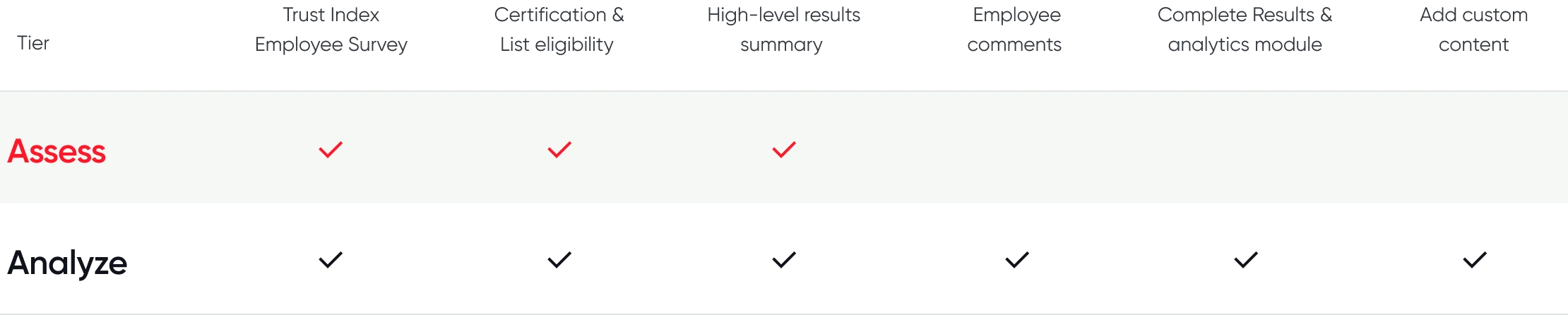
Assess subscription
Want to upgrade?
If you would like to add custom content to your survey, receive complete survey results, and use our powerful Results module for deeper insights, our Analyze tier may be better for you.
Reach out to your Customer Success Manager to know how to upgrade.
Want to upgrade?
If you would like to add custom content to your survey, receive complete survey results, and use our powerful Results module for deeper insights, our Analyze tier may be better for you.
Reach out to your Customer Success Manager to know how to upgrade.
